
Split-n’-share
Split-n’-share
CS473 Introduction to Social Computing - 2024 Fall
Project 4: High-fi Prototype
Nghiem Xuan Son
Thuy Trang Nguyen
Mai Nguyen
Project Summary
Many online shopping platforms offer bulk discounts or sell items exclusively in large quantities, making it difficult for individuals to save money without facing logistical and financial challenges. To address this, Split-n’-Share enables KAIST students to share the cost and quantity of bulk purchases collaboratively, simplifying access to discounts while avoiding the hassle of managing excess quantity. Unlike other platforms, it fosters social interaction within the close-knit KAIST community by ensuring trust through verified student participation and a transparent, community-exclusive review system, with the potential for adaptation and scalability to other communities in the future.
Instruction
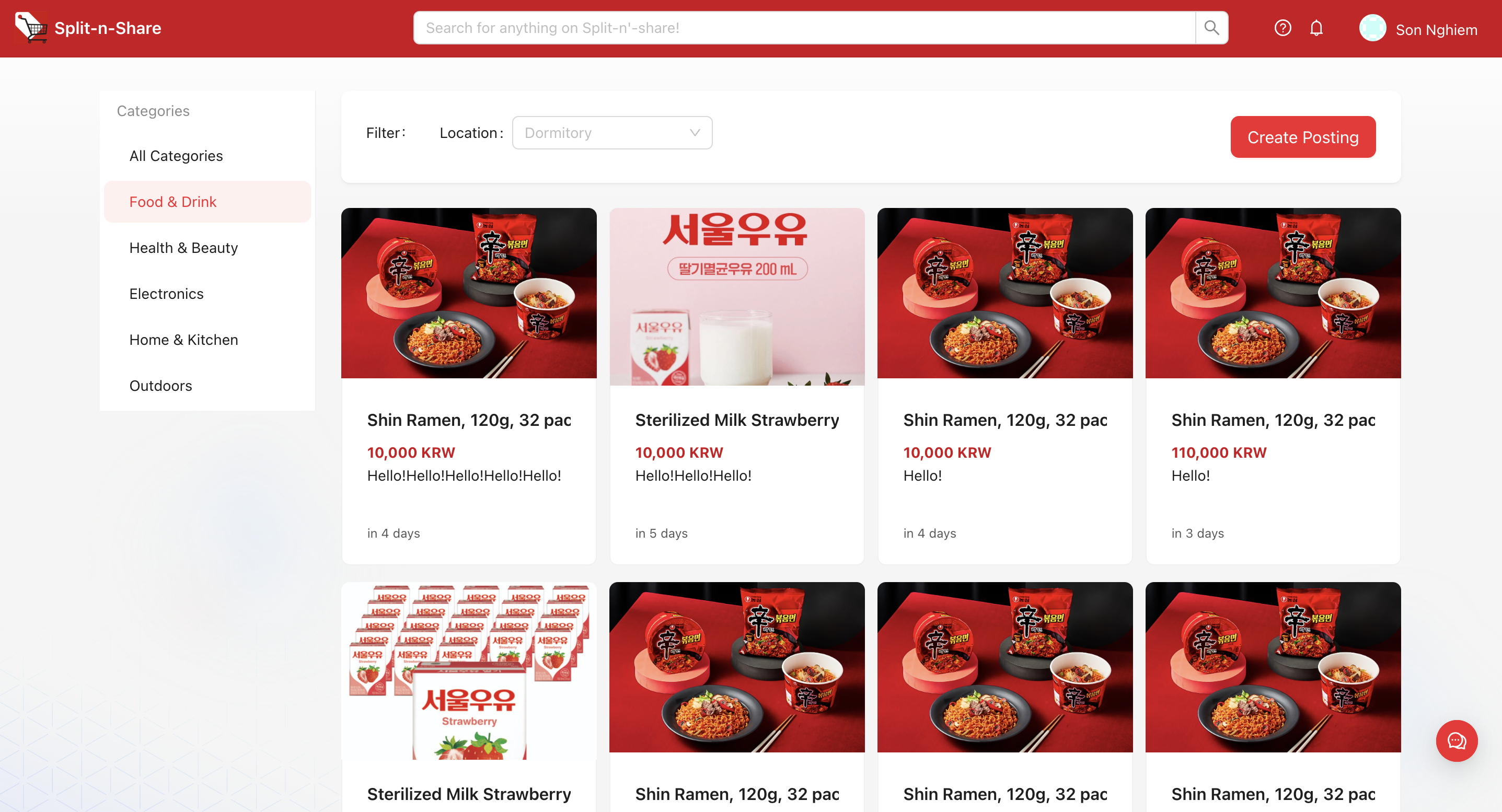
Browse Products Page
The Browse Products page is displayed immediately upon login and served as your entry point for discovering ongoing group-buying opportunities. Here, you can:
- Search for Products: Use the search bar to quickly find items of interest.
- Filter by Category: Choose specific categories to narrow your options and find exactly what you need. Right now we have the filter for Pick-up location (specifically KAIST dormitories) and categories of the products.

Creating a Joint-Purchase Posting
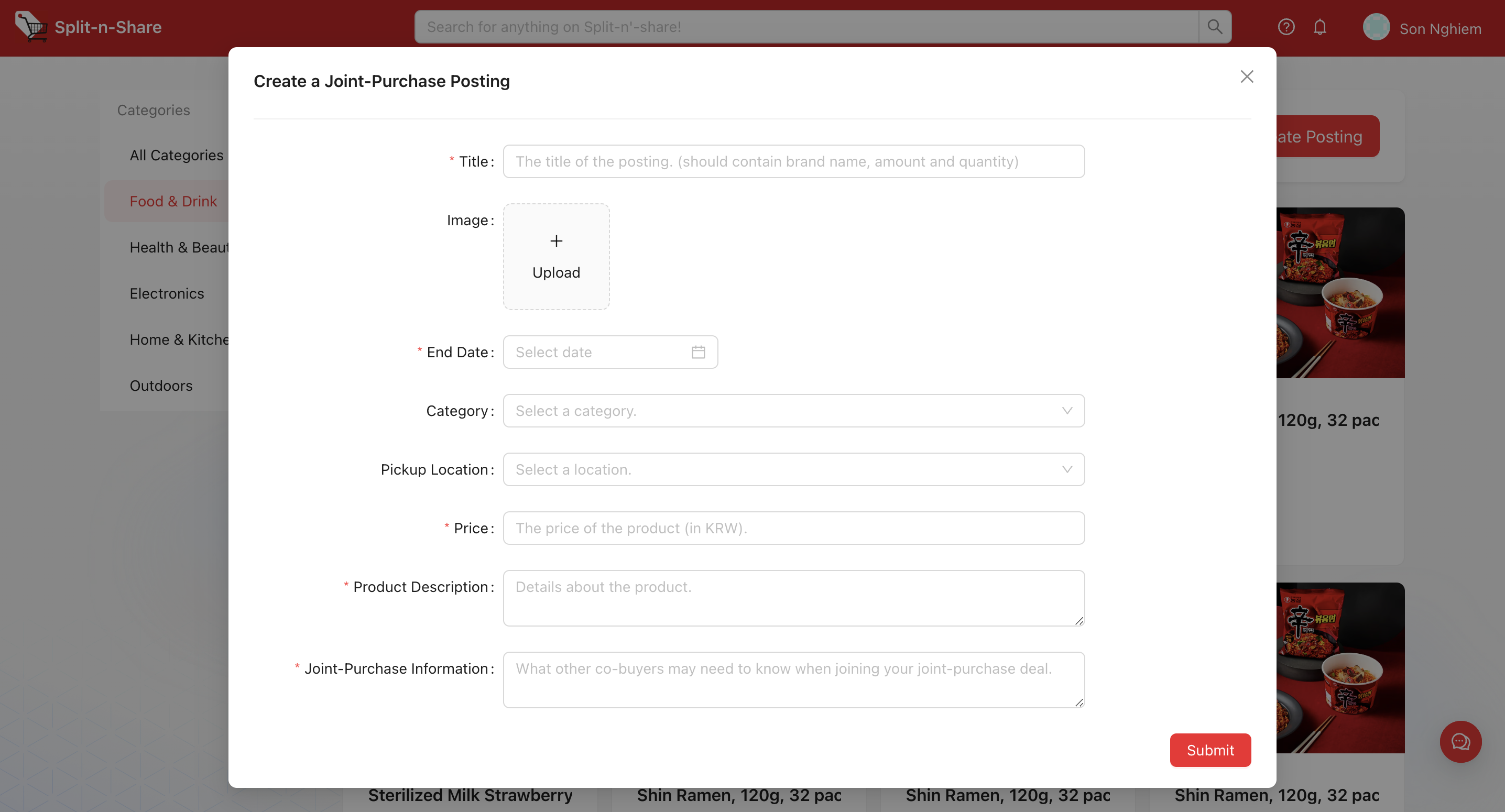
Click on the button Create Posting on the main product grid page. The posting will include these fields to be filled:
- Title & Image: The user can specify a title that includes the brand, amount, and quantity. The user can add one or more images that describes the product and make the listing more attractive and informative.
- End Date & Category: Define how long the offer will be available by selecting an end date. The user can also choose the category that best describes their product.
- Pickup Location & Price: Dropdown list with all KAIST dormitories listed and also the option “others” for flexibility. The price field allows user to see the total cost which will be divided among the participants.
- Product Description & Joint-Purchase Information: Provide important details about the product and any special instructions or requirements.
Product Detail Page
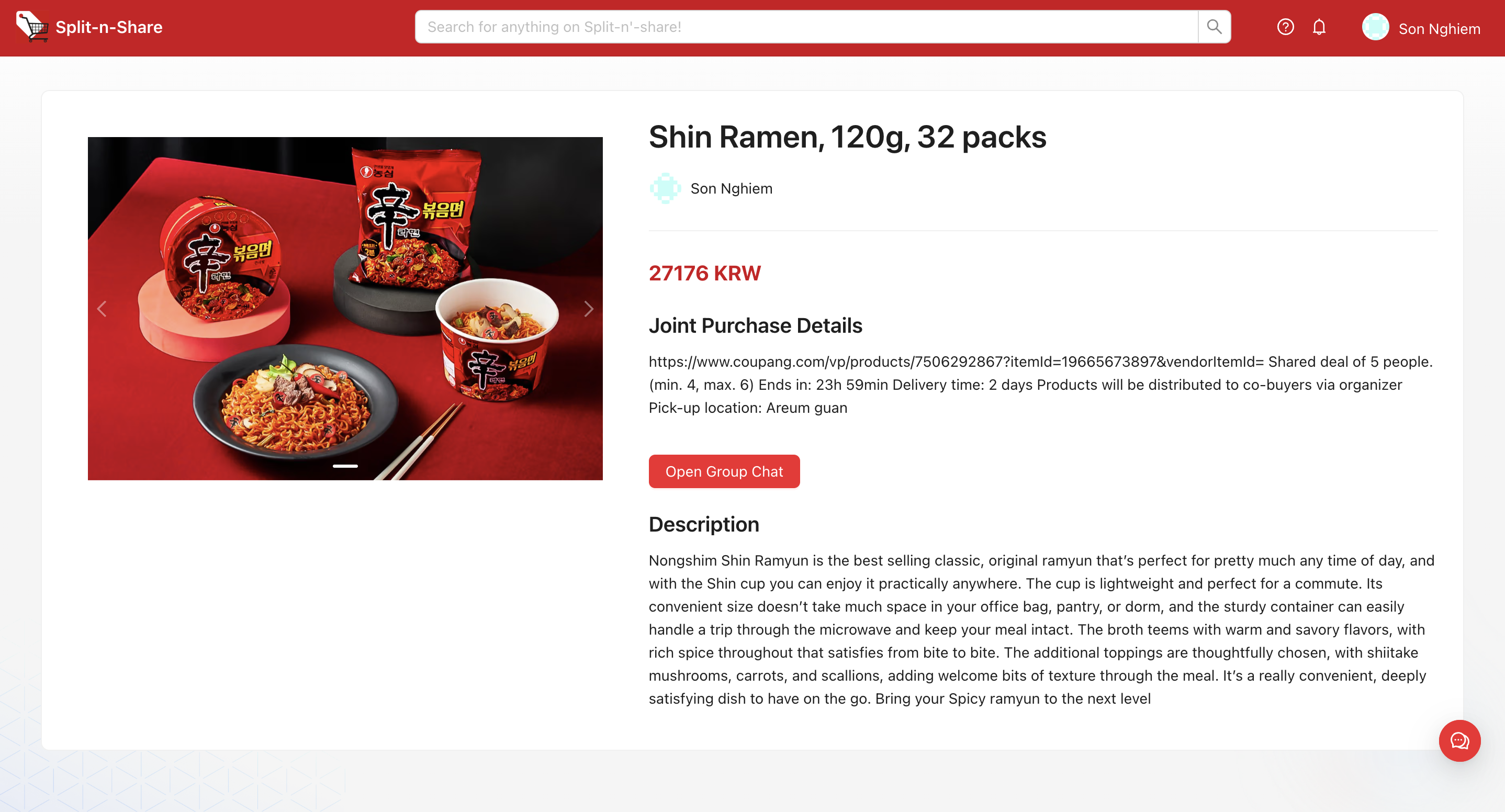
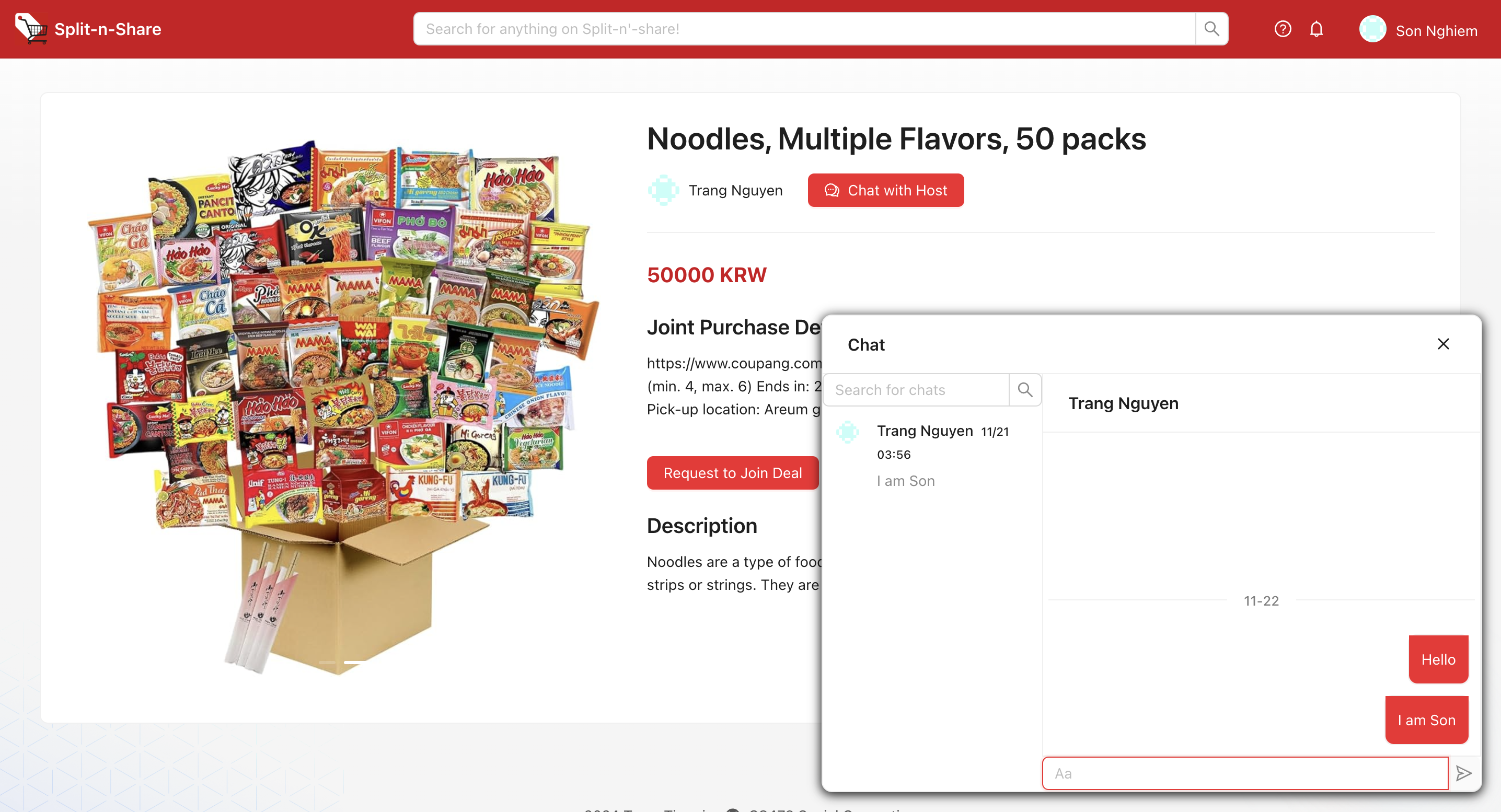
The product page will display all the information as filled in the Create Posting.
- If the user is the host of the deal:
There will be the button Open Group Chat. The user can create a group chat and add all the co-buyers into the chat for spontaneous and seamless communication. Each group chat will correspond to one product and can only add the co-buyers in the co-buyers list of that specific product. Only the host can add/delete members from the group chat.
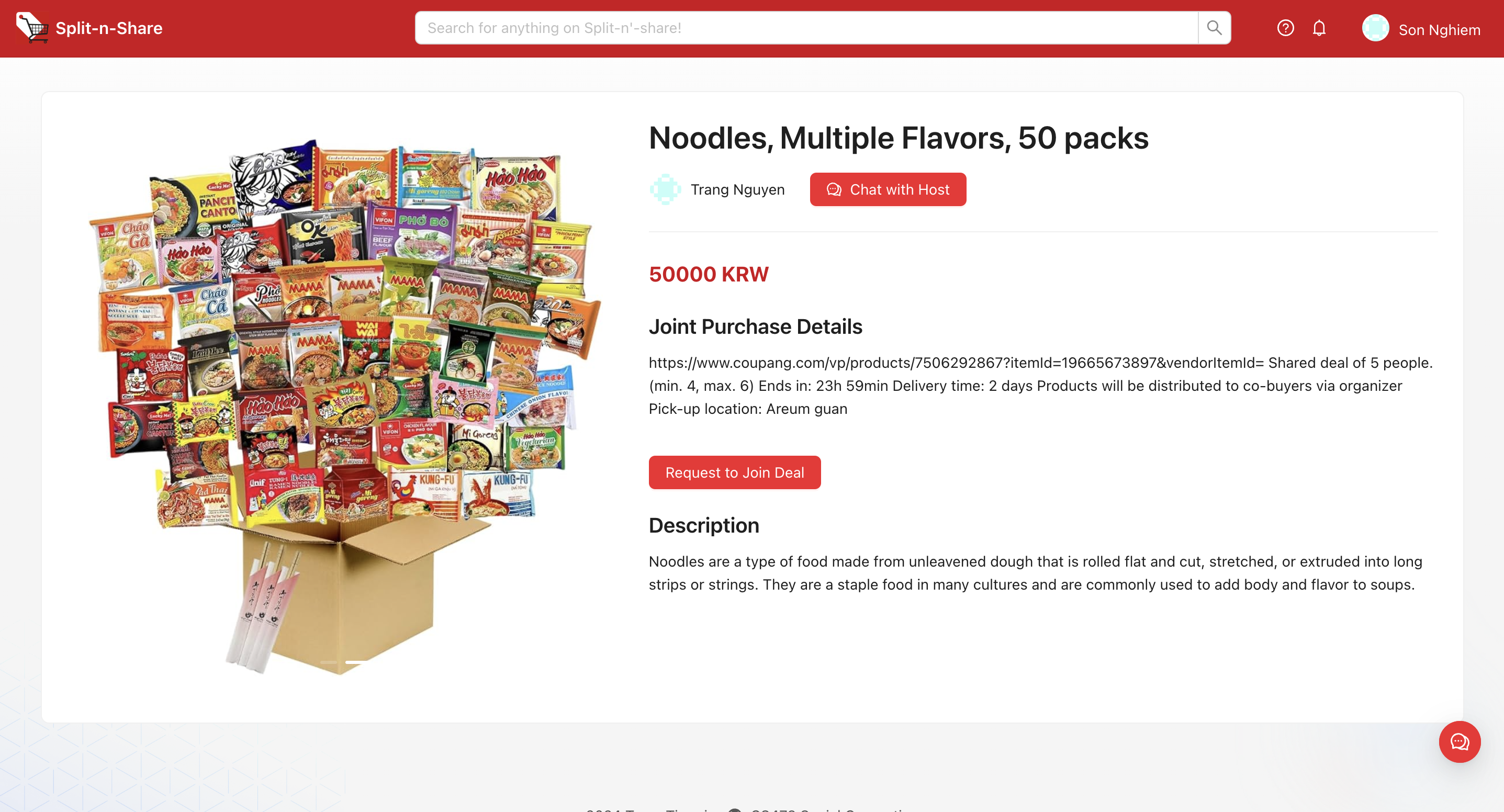
- If the host of the deal is another user:
There will be two buttons:
- Chat with Host button where users can click and it will spontaneously create a new chat (or opening an existing chat if the user has talked with the host before) so the user can discuss more detail with the host before deciding to join the deal.
- Request to Join button where users can click to request to join the deal. The request will be sent to the host and the host will decide to reject/accept the user to the deal or not.
User Page
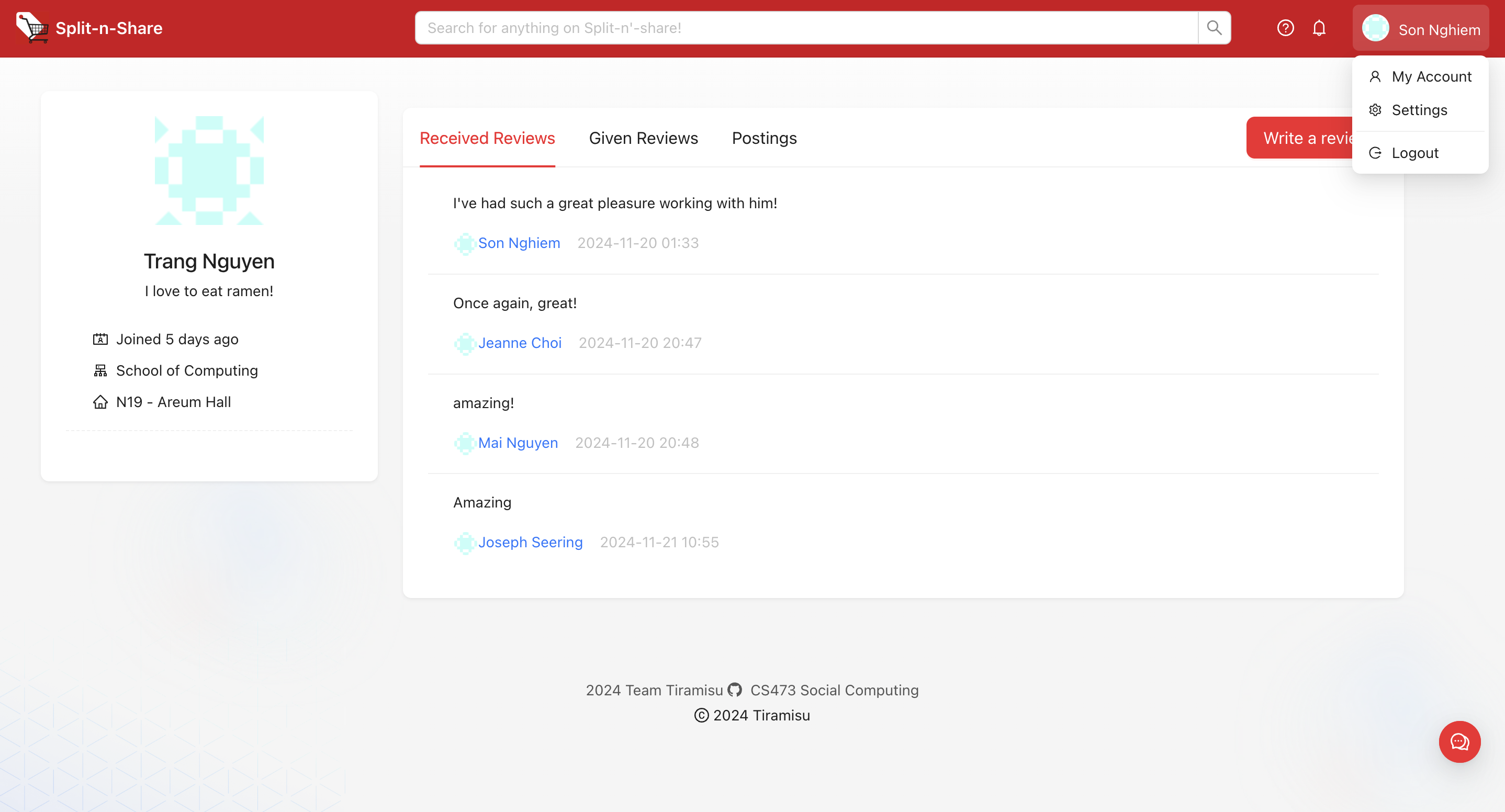
This page will contain the personal public information of users, along with their given reviews to other users, received reviews from other users, their current and past postings.
When checking out a deal, the user can click on the host’s page to check their reviews for credentials.
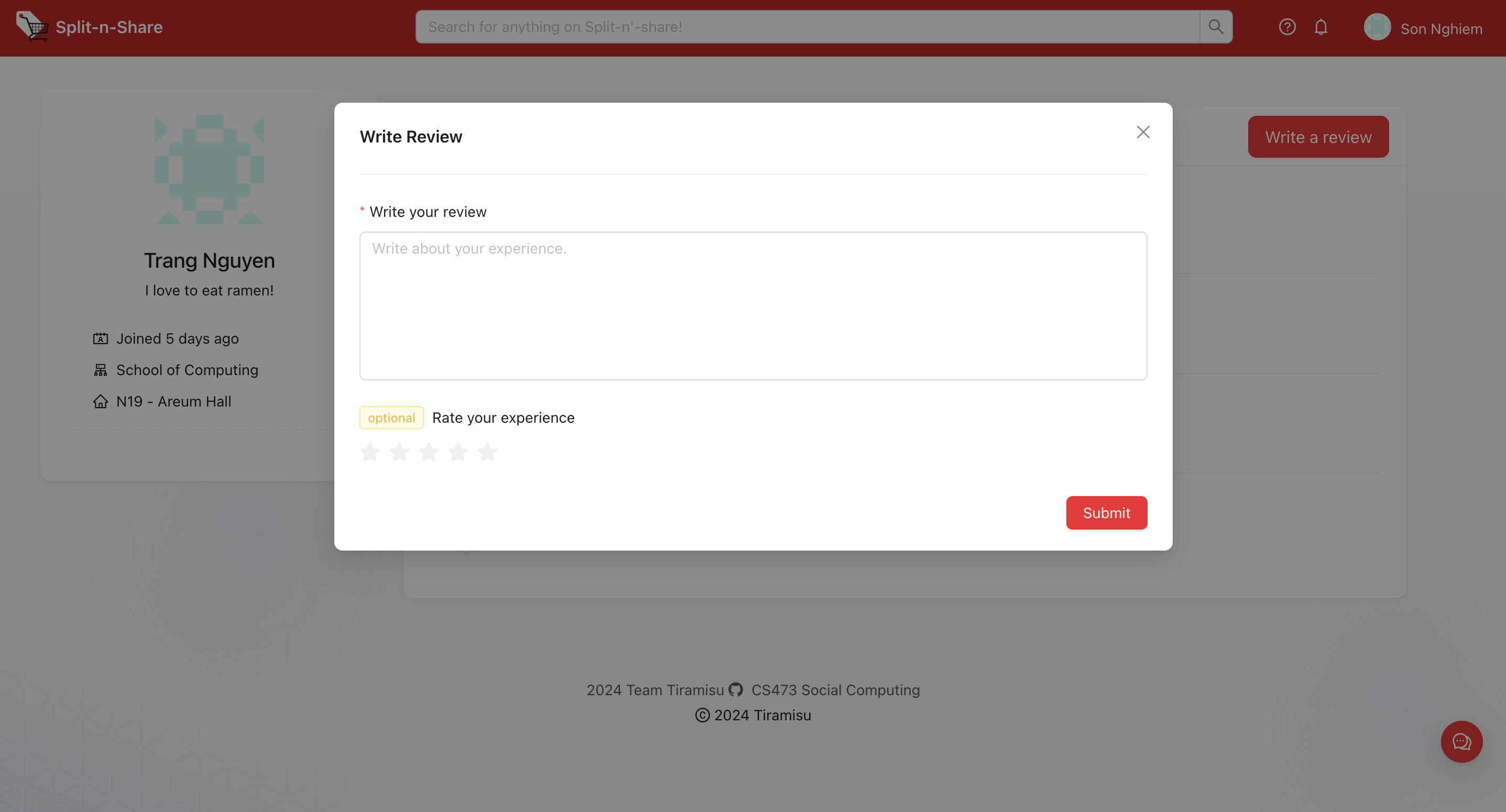
Once the user has finished a deal with the host, the user can then post a review for the host, describing their experience with the host by both text and the star review. (Reviews can only be posted by the user that has conducted a shared deal with the host).
URL of the prototype
https://split-n-share-olxp.onrender.com/
This prototype is specifically built for desktop browsers only and may not function as intended on mobile devices.
URL of Git repository
https://github.com/Casheeew/split-n-share
Libraries and frameworks
We used TypeScript as the language of implementation for both the frontend and backend of our app. We used React.js with Ant Design as the main frameworks to build our user interface, Express for building APIs on the server side, Socket.IO for bidirectional communication between the web client and the server for real-time chat functionality, and MongoDB for our database. We host our website on Render and our database on MongoDB Atlas.
Frontend libraries and frameworks:
Backend libraries and frameworks:
In addition, we used
Coding support tools we used:
Individual Reflections
Thuy Trang Nguyen
I worked on the backend portion of the system, specifically developing the schemas and implementing the API endpoints for the website. This included designing database schemas using MongoDB, creating models to efficiently represent key entities such as products, group purchases, and user profiles, and setting up RESTful API routes to handle requests for these entities. I also worked on integrating business logic to manage group-buy functionality, including the creation, update, and tracking of group deals.
One of the main challenges I encountered was integrating the backend with the frontend. Ensuring that the APIs were consumed properly by the frontend required rigorous testing and debugging of HTTP requests and responses. There were issues related to data formatting mismatches between frontend expectations and backend outputs, which led to discrepancies in the user interface. Addressing CORS (Cross-Origin Resource Sharing) policies, maintaining consistent API contracts, and ensuring that the asynchronous nature of API responses was handled properly also presented considerable difficulties.
One of the key skills I learned during this project was a deeper understanding of how to manage data consistency and concurrency, particularly when multiple users are joining or creating group-buy deals simultaneously, which was crucial for the system’s reliability. Another valuable skill I learned was effectively implementing authentication and authorization flows using JWT (JSON Web Tokens), which enhanced the security of the application and ensured that only authorized users could access specific features.
Mai Nguyen
My primary contribution was building the front end of the website, based on the foundational setup created by my teammate Son. I focused on implementing specific functionalities for the UI of the product page, including features such as posting, displaying information for group-buying deals from both the host’s and co-buyers’ perspectives, and enabling purchase requests and filtering options. In addition, I reviewed the app’s overall workflow and proposed new features and functions (paper prototype) to enhance the user experience, which my team will further refine in later high-fidelity prototype milestones.
One of my biggest challenges was learning React and front-end development, as I had little prior experience before starting this project. I spent considerable time understanding core React concepts, including creating reusable components, managing state, and passing data through props. I also struggled to intergrate the front end with the back end, as I had to work closely with my teammate Trang to resolve mismatches and ensure smooth functionality.
Throughout this process, I developed essential skills as a front-end developer. I became more confident at reading and applying library documentation, which enabled me to integrate third-party libraries effectively and customize their functionality to fit our needs. Beyond technical abilities, I gained valuable experience collaborating with others on a software project, particularly using tools like Git for version control and teamwork. These experience significantly boosted my confidence and prepared me to take on more complex development tasks in the future.
Son Nghiem Xuan
I focused on developing the user interface of our web application. I was responsible for laying the groundwork and setting up the environment and dependencies so that my teammates can easily contribute. Additionally I focused on the login and user profile pages where I implemented the user authentication flow and features such as viewing and managing account details. I also worked on the chat functionality to enable real-time communication between group-buying participants, and jointly worked with Mai to deliver the product browsing page.
One of the major difficulties I faced when working on this project was when learning to use the Ant Design Pro and UmiJS libraries. These are convenient frameworks that provide a lot of tools that we could utilize, however a lot of the discussions and the resources that I find online are in Chinese which I am not very familiar with. Oftentimes, the example code in the documentation looks completely different when I switch the language to Chinese. In learning to use these libraries, I had to use a lot of my intuition and trial-and-error to figure out the correct path.
Through this experience, I learned a lot about how to navigate and easily adapt to limited-resource landscapes. Even when I could find little information online, I developed the ability to explore and find creative workarounds which greatly helped my problem-solving skills and resilience as a developer. I also learned a lot about networking concepts and how to use web sockets to smoothly send messages between the client and the server in real time. The technical difficulties I faced when building the system provided me with a deeper understanding of the social-technical gap in social computing—how hard it is implement the technical parts of a social system, but it also allowed me to deeply understand what we can achieve when we work collaboratively together.